
- Maus Knowledge Base
- Maus Software
- Questionnaires (Advisors)
-
Maus Software
- Exit Discovery (Exit Planning)
- Exit Planning (ValueMax)
- Strategic Planning (MasterPlan)
- Attract (Marketing/Lead Gen)
- Questionnaires (Advisors)
- Project Management (Milestones & Projects)
- Performance Analysis (KPIs)
- Setup (Advisors)
- Client Needs Analysis (Advisors)
- Policies Manager
- Document Manager
- Performance Review
- General Settings
-
SafeWrite
- Policies Manager
- Account Settings
- Risk Register
- Incident manager
- Training Register
- Audit Builder
- NCR Register
- Corrective Actions
- SWMS Doc Register
- Contractor Register
- Electrical Register
- Chemical & Hazardous Substances Register
- Asset Register
- Site Register
- Activity Register
- General
- SafeWrite for Consultants
- Audits & Inspections
-
StockMarket Plus
What are the Steps to Start a Questionnaire in a Client Account?
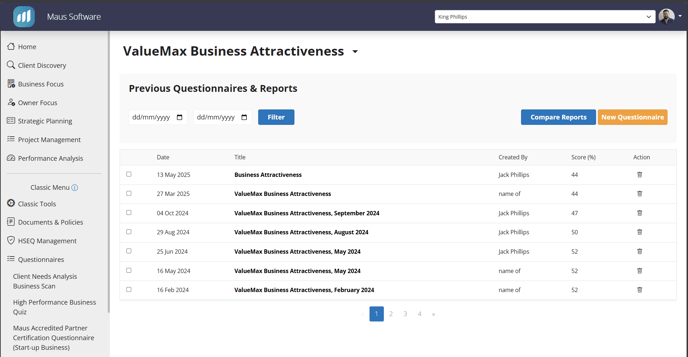
1. Select the questionnaire you would like to set up via the “Questionnaires” heading on the left hand menu. Once in the following screen, you will need to locate the “New Questionnaire” Prompt.
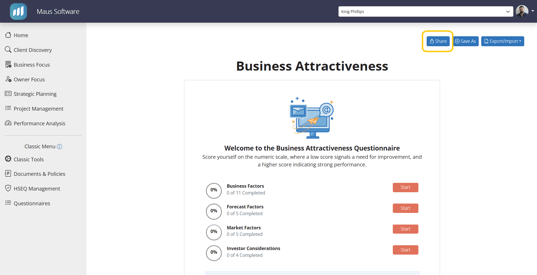
2. After selecting “Start Questionnaire” you will be moved into the questionnaire, where you can start answering the questions with the client. You will also notice that you will have the ability to export the questionnaire to excel if you require, Or you can utilize the “Share” prompt within the “Reports/Tools” to generate and send an email to your client with a link to the questionnaire:
4. You will also note that the questionnaire has been added to the page imaged in step 1, should you wish to access it again moving forward